
Guides
What's wrong with this 3D asset?
MeshCrunch · Engineering ·
We ran MeshCrunch's browser-side inspection on a 92.3 MB AI-generated pug, before and after optimizing: what it found, what it skipped, and the report.
On this page
Inspect answers a question you cannot answer by looking at a model. Is this asset fit to ship, and if not, what is wrong with it? It runs in your browser, over the model already on screen. It creates no job and spends no processing credits.
We pointed it at the same pug used elsewhere on this blog. It is an interior-scale figure generated by an AI model and downloaded as OBJ: 92.3 MB, 1,993,980 triangles, per-vertex colours, no textures and no UVs. It is the kind of asset people now produce in seconds and cannot ship anywhere.
Valid, and not ready
The first thing the report separates is validity from readiness. The geometry came back valid. Nothing was degenerate, nothing had broken normals, and no part of it was malformed.
Readiness is a different question, and there the answer was no. The asset is scored against five delivery targets, each with its own triangle and file size budget.
- Desktop Web: optimize. The budget is 1,500,000 triangles and 50.0 MB, against this asset's 1,993,980 and 92.3 MB.
- Mobile Web: not ready. The budget is 150,000 triangles and 15.0 MB.
- Web AR: not ready. 100,000 triangles and 10.0 MB.
- 3D Commerce: not ready, and it also flags the missing UV coordinates.
- Mobile Game: not ready, and it recommends an LOD chain.
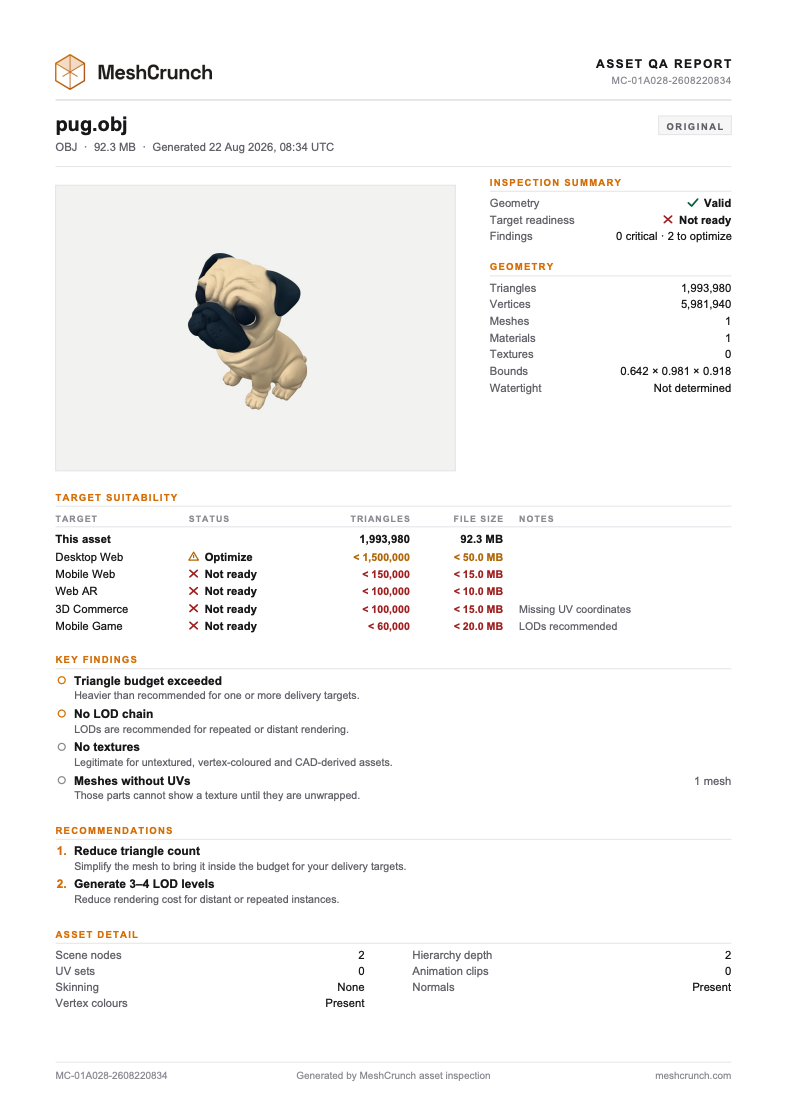
There is deliberately no score out of a hundred. A heavy mesh is not an invalid one, and a single number would blur two findings that call for different work.
What it declined to measure
This is the part worth trusting. Above 600,000 triangles the map-based topology checks are declined, and the report names every one it skipped.
- Non-manifold edges
- Boundary edges
- Duplicate vertices
- Duplicate faces
- Inconsistent winding
- Disconnected components
A confident zero about an unchecked property is the one failure a QA report cannot recover from. Those fields read as not measured, rather than as clean.
Then we optimized it
One simplification pass in auto mode took the same asset to 71,136 triangles and 1.4 MB. Desktop Web, Mobile Web and Web AR all moved to ready. 3D Commerce and Mobile Game still want work: one needs UVs, the other a smaller budget or an LOD chain.
Asset QA report
pug.glb
71,136 triangles · Warnings · Ready for 3 of 5
Where it can be used
- Desktop Web✓ Ready
- Mobile Web✓ Ready
- Web AR✓ Ready
- 3D Commerce! Optimize
- Mobile Game! Optimize
What it found
Invalid normalsWarning
Zero-length or non-finite normals leave shading undefined where they occur.
Inconsistent windingWarning
Adjacent faces disagree about surface orientation, which can produce dark patches under single-sided rendering.
Triangle budget exceededOptimize
Heavier than recommended for one or more delivery targets.
No LOD chainOptimize
LODs are recommended for repeated or distant rendering.
Checks the engine declines are named rather than reported as zero. Past 600,000 triangles the map-based topology checks are skipped, and the report says which.
The more interesting change is that the mesh became inspectable. Under the budget the deep checks ran, and they found things: 14 triangles wound inconsistently, 2 non-manifold edges, 2 duplicate faces and 1 invalid normal.
You cannot conclude that optimization introduced them. At 1,993,980 triangles those checks were declined, so nothing ever measured the source. That is the honest reading, and it is exactly what the report supports.
The exported report
One page, and an ordinary PDF you can attach to a handoff. It carries the summary, the target table, the findings, the recommendations and the asset detail.
One number on it deserves an explanation. The vertex count is what the browser parsed rather than the welded mesh, so this OBJ reports 5,981,940 vertices against 1,993,980 triangles, which is exactly three per face.
What it does not check
- UV overlap and packing efficiency are not measured at all.
- A format with no in-browser loader cannot be inspected. OFF is the one in our list.
- Animation is not inspected, and the optimizer refuses skinned sources anyway.
Each of those is a browser-side limit rather than a policy. Inspection is what a laptop can afford in a tab while you are looking at the model.
What it costs
Nothing. Inspect creates no job, so it spends no processing credits at any file size. The viewer and the turntable exporter work the same way.
That line is deliberate. Processing credits pay for server compute, and reading a model your browser has already loaded is not that.
Run it twice: once before you optimize, to learn what needs fixing, and once after, to see whether the fix worked and what it changed.